Getting Help
Reporting a Bug
A bug report is for something wrong inside the Remotle app: a message, a picture fault, a device that does not work. It is sent from the app, so it reaches Computle with the device’s diagnostics and the app’s log files already attached. A support ticket, by contrast, is raised in the portal and carries only what you type and attach; see Raising a Support Ticket.
Send a report
Section titled “Send a report”The reporter sends it from Remotle: Settings, Report a bug, or the Report tab of the session menu during a session. The steps are on the Remotle site: Reporting a Problem.
| A report carries | Limit |
|---|---|
| A summary and a description | 120 and 4,000 characters. Both are required. |
| The workstation it was about | Chosen in the app. |
| Attachments | Up to 5 files, 10 MB each, 25 MB in total. |
| The app’s version, platform and operating system, and the device’s Support Code | Added by the app. |
| The Diagnostics result and the end of the app’s log | Added by the app. |
When the report is received it gets an eight-character reference, and the reporter is emailed a copy with the subject “Bug report [reference] — [summary]”. A person can send five reports an hour. After that the app refuses further reports until the hour has passed; a Tenant Admin can raise a support ticket in the meantime.
Follow a report in Remotle
Section titled “Follow a report in Remotle”The reporter sees their own reports in the app under Report a bug, Your reports, with a badge for unread replies. Each report shows one of these statuses:
| Status | What it means |
|---|---|
| Received | Computle has the report. |
| In progress | Engineering has started on it. |
| Resolved | The work is finished. |
| Closed | The report was closed without a change. |
The reporter reads replies and answers in the same place. Up to 30 replies an hour; after that the app shows “Too many replies in the last hour. Please try again later.”
See every report in the portal
Section titled “See every report in the portal”A Tenant Admin sees every report from the organisation under Support, on the Reported bugs tab. The tab is shown when bug reports are enabled for your organisation.
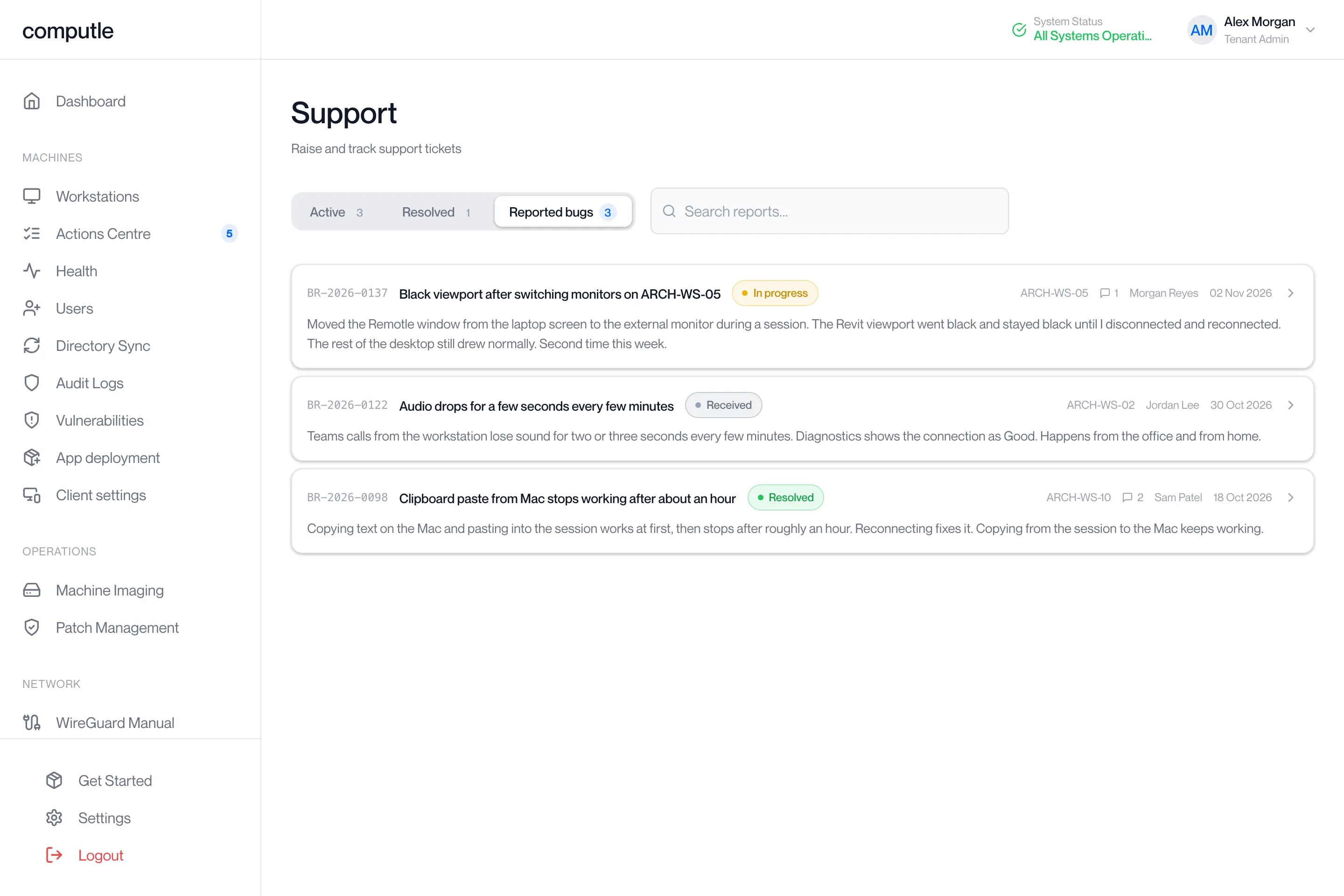
Each row shows the reference, the summary, the status, the workstation name, how many replies it has, who sent it, the date, and the first lines of the description. Search reports… matches the summary, the reference, the reporter or the workstation name. The list shows the 200 most recent reports and refreshes every minute. “No bug reports” and “Reports sent from the Computle client appear here.” are shown before the first report.
The status badge is the stage of the engineering work: “Received” until the report has been looked at, then the stage name as the work moves, green when it is complete.
Read and reply as an administrator
Section titled “Read and reply as an administrator”Click a report to open it.
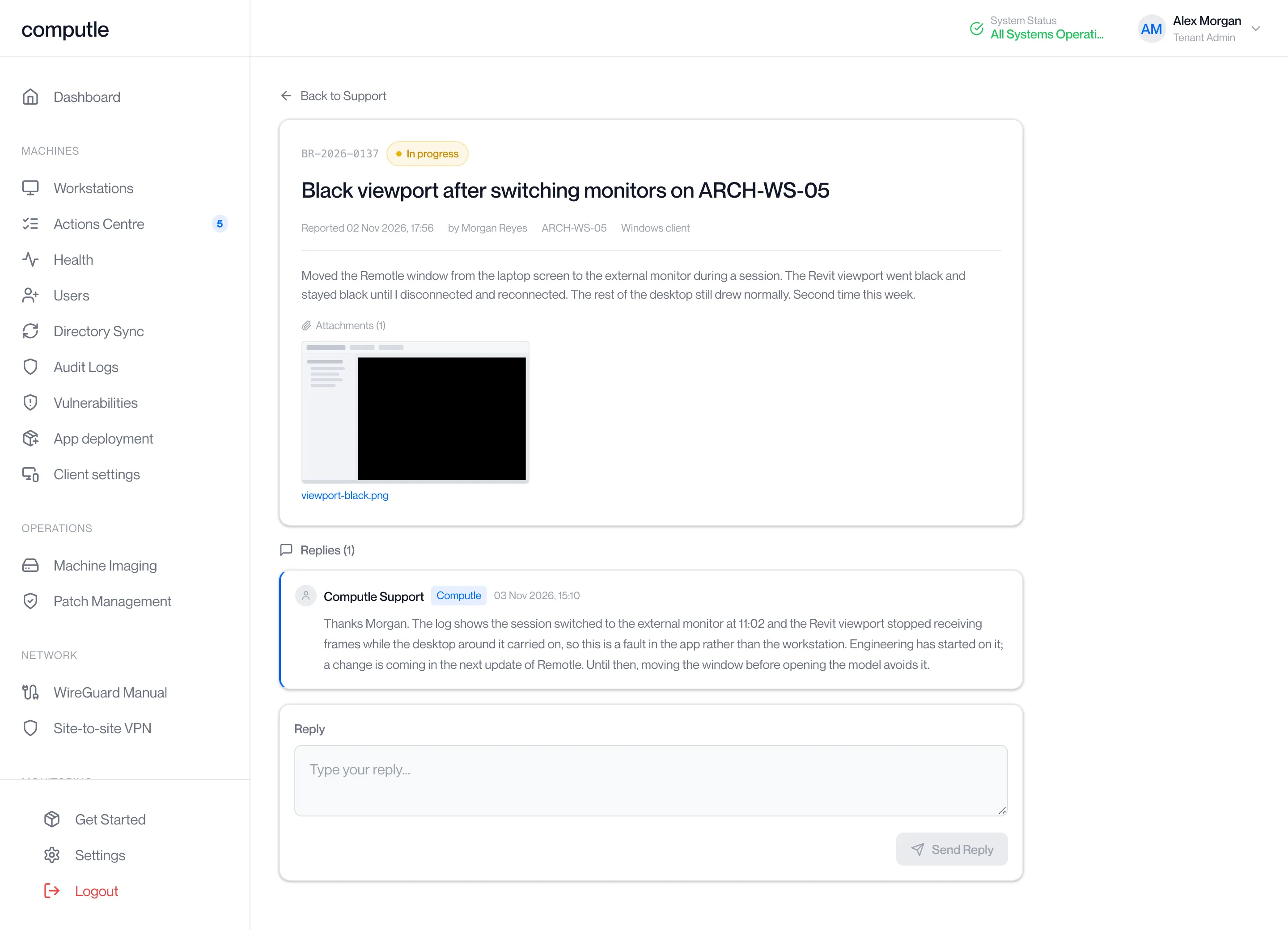
The header shows the reference, the status, the summary, “Reported [date] by [name]”, the workstation and “[platform] client”. Below are the description as the reporter wrote it, the attachments, and under “Replies” the conversation so far. Replies from Computle carry a “Computle” badge.
-
Type under Reply.
Up to 4,000 characters.
-
Click Send Reply.
The portal shows “Reply sent”. Your reply joins the thread the reporter sees in Remotle.
| Message | What to do |
|---|---|
| “A reply cannot be empty” | Type something before clicking Send Reply. |
| “Failed to send reply” | Check this device’s connection and click Send Reply again. |
| “Report not found” | The link is to a report in another organisation, or one that no longer exists. Go back to Support and open it from the list. |
Bug reports have no Mark Resolved button. The status changes as the engineering work moves.
What happens after
Section titled “What happens after”- The report is stored and given its reference the moment it arrives, and the reporter receives the email copy.
- Computle reads the report, the diagnostics and the logs, and replies in the thread. The reporter is emailed “Bug report [reference] updated — [summary]” each time Computle replies; the email does not carry the reply text, which is read in Remotle or the portal.
- Replies from Computle state what was found. Where a change is coming, they say it is in the next update of Remotle; they do not give dates or version numbers.
- The status moves to Resolved when the change has shipped, or Closed when no change is needed.
If the reporter cannot sign in to Remotle to send a report, a Tenant Admin raises a support ticket instead and attaches screenshots.
Related pages
Section titled “Related pages”Questions
Section titled “Questions”Who sees a bug report?
Section titled “Who sees a bug report?”The reporter, in Remotle. Every Tenant Admin in your organisation, in the portal. Computle.
Can a user see their report in the portal?
Section titled “Can a user see their report in the portal?”No. Only Tenant Admins open the Reported bugs tab. The reporter follows it in Remotle.
Should a user send a bug report or should I raise a ticket?
Section titled “Should a user send a bug report or should I raise a ticket?”Both can be right. A bug report carries the logs, so it is the better record of a fault in the app. A ticket is the place to say that someone cannot work and to track the fix for your organisation. Quote the report’s reference in the ticket.
Are the logs private?
Section titled “Are the logs private?”They stay with Computle and are read only to understand the report. They can include the reporter’s account email and network address.